Get started today with MS Excel Desktop and/or Excel Online
Simply follow the instructions below.
Email:
hello@technbash.com
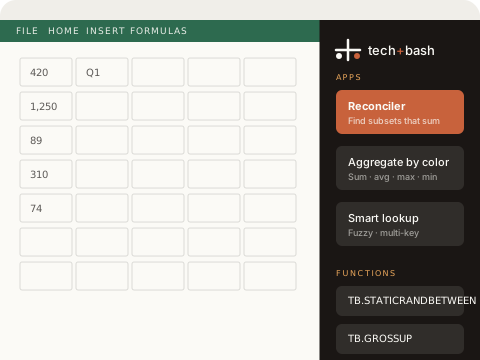
Option 1
Windows Excel Desktop
-
Download the manifest
Click here to download manifest.xml and save it somewhere permanent (e.g.
Documents\tech-bash). -
Open Excel → Insert → Add-ins
In the ribbon, go to Insert → My Add-ins → Manage My Add-ins → Upload My Add-in.
-
Select the manifest file
Browse to the file you saved in step 1 and click Upload.
-
Open the task pane
A tech+bash button will appear in the ribbon. Click it to open the add-in panel.
Video walkthrough
Option 2
Excel Online Mac & Windows
-
Open Excel Online
Go to office.com and open any workbook.
-
Insert → Add-ins
In the ribbon, click Insert → Add-ins → Upload My Add-in.
-
Upload the manifest
Download manifest.xml and upload it in the dialog.
-
Open the task pane
Click the tech+bash button that appears in the ribbon to launch the panel.
Video walkthrough
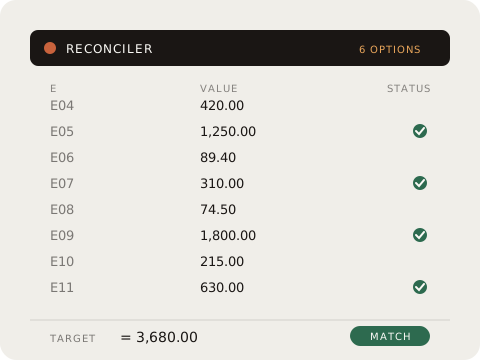
Reconciler
Select a range of numbers and a target value. tech+bash finds every subset that sums to it — up to 10 options, highlighted in Excel.
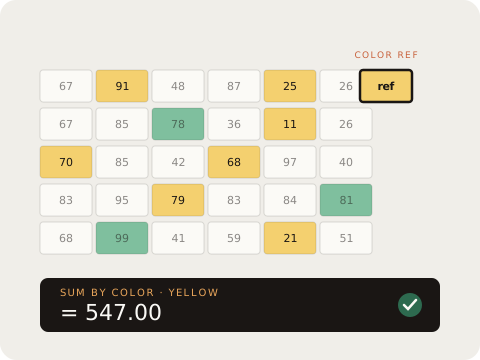
Aggregate by color
Pick a reference cell color, choose SUM, AVERAGE, MAX, or MIN — the result lands in any cell you select.
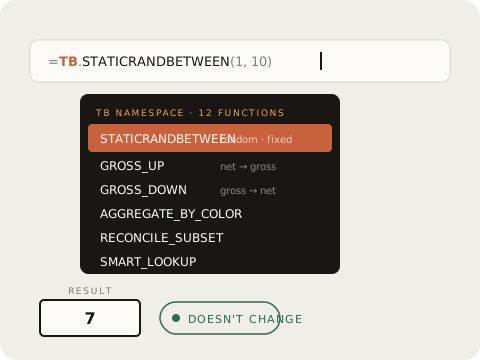
Custom functions
TB.STATICRANDBETWEEN, TB.GROSSUP, TB.GROSSDOWN and more — formulas Excel should have but doesn't, available in the TB namespace.

